Run your business without running between systems.
John DL Business OS is being built to bring your companies, people, projects, operations, and important information together—without losing control of who can see what.
No demo pressure. We’ll keep you informed as early access develops.
ALL COMPANIESOne clear view
01
Your Main BusinessProjects · People · Finance
02
Second CompanySeparate and secure
03
Future VentureReady when you are
See the system taking shape
A clear view of the work that runs your business.
These product previews show how John DL Business OS brings company information together while keeping every team, role, and business properly separated.
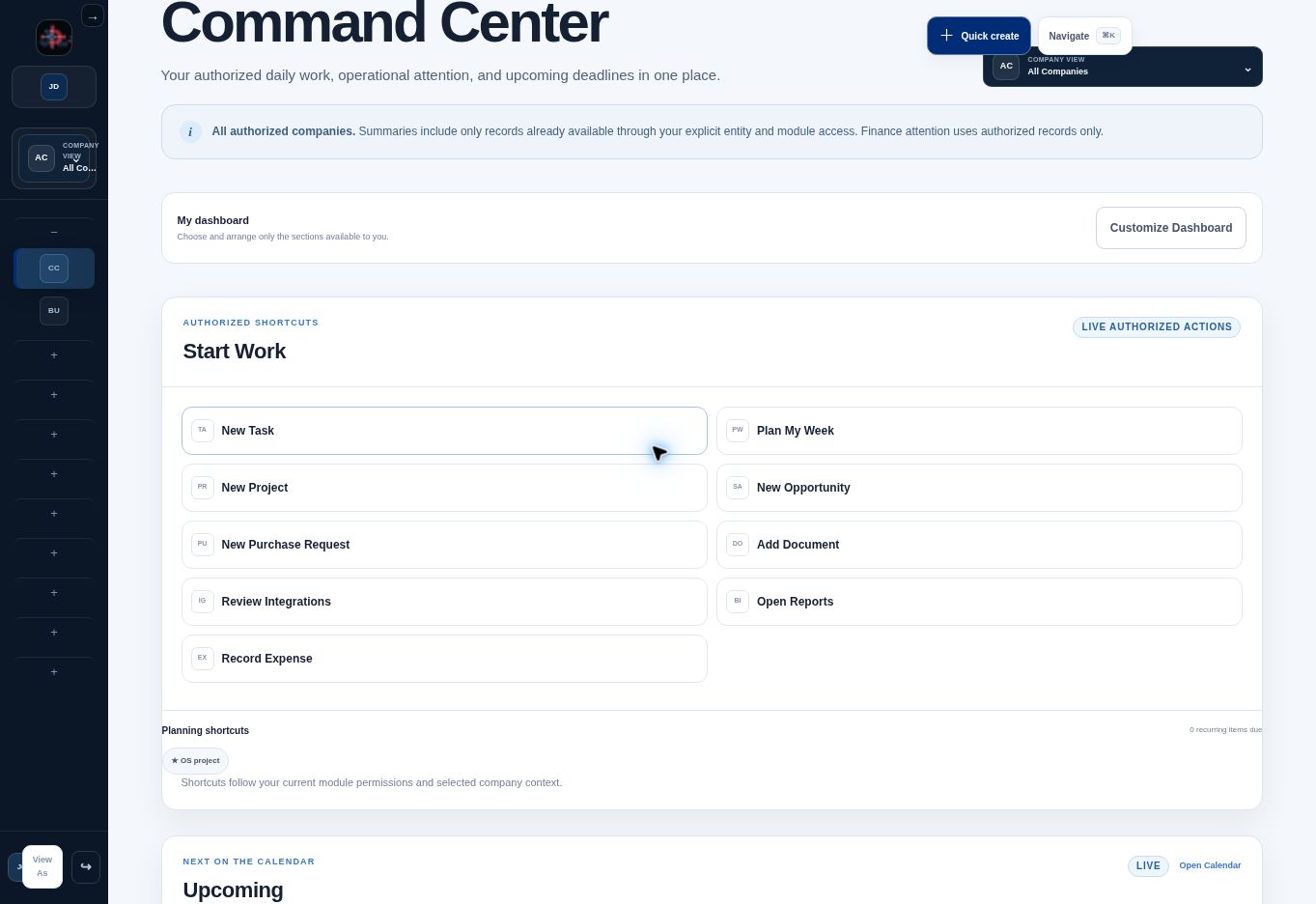
01 · COMMAND CENTER
Know what needs attention before the day gets away from you.
See active projects, upcoming work, overdue tasks, business activity, and important numbers from one central command center.
At-a-glance business health
Upcoming and overdue work
Company-specific or combined view
Live Command CenterREAL PRODUCT
02 · MULTI-COMPANY CONTROL
Switch businesses without losing the bigger picture.
Choose one authorized company for a focused workspace or use All Companies for the ownership-level view.
More than a task manager. A home for how your business operates.
John DL Business OS is designed to connect the work that is usually scattered across spreadsheets, inboxes, calendars, file folders, and separate software subscriptions.
01
Projects & Tasks
Plan projects, assign work, track deadlines, and see what is overdue, upcoming, or complete.
02
Calendar & Planning
Bring task, project, compliance, and business dates into one authorized calendar.
03
Customers & Contacts
Organize people and companies while keeping relationships attached to the correct business.
04
People & Departments
Manage employees, managers, departments, schedules, workload, and department-level access.
05
Documents & Knowledge
Keep important files, internal knowledge, and company records organized and permission-aware.
06
Finance
Track authorized accounts, transactions, expenses, bills, and business-level financial attention.
Track stock, equipment, assigned assets, low-stock attention, and ownership by company.
09
Sales & Marketing
Follow opportunities, campaigns, customer activity, and the work behind business growth.
10
Service & Operations
Coordinate requests, operational work, recurring responsibilities, and customer service.
11
Compliance & Approvals
Surface deadlines, decision queues, required reviews, and authorized approval steps.
12
Reports & Insights
Turn authorized operational information into useful dashboards and business reporting.
Features are being released in stages. Waitlist members will receive clear updates as modules become available for early access.
Less switching. More clarity.
The operating foundation your business can grow into.
Your businesses, organized
Keep each company separate while still seeing the full picture when you need it.
The right access for every person
Give owners, managers, departments, and employees only the access their work requires.
Work that stays on track
Bring projects, tasks, schedules, approvals, and deadlines together in one operating system.
Built for secure growth
Protect sensitive business, HR, and financial information as your organization grows.
How it works
Set the business context once. Let the system keep work organized.
1
Choose the company
Work inside one authorized company or use All Companies when your role allows an ownership-level view.
2
Give people the right access
Permissions follow the company, department, role, module, and sensitivity of the information—not merely a job title.
3
Run work from one command center
Tasks, projects, approvals, deadlines, attention items, and authorized business metrics come together in a daily workspace.
Built for where you are—and where you’re going
One business or several, you deserve a system that fits.
FOR SMALL BUSINESS
Replace scattered tools with one clear home.
Keep daily work, people, documents, customers, and important decisions connected.
FOR MULTI-COMPANY OWNERS
See the whole organization without mixing the details.
Move between authorized companies or use an all-companies view built for ownership.
Security designed around real organizations
People should see what they need—not everything the company knows.
Access is designed to be enforced by the system, not just hidden from the menu. A person’s permissions can be limited by company, department, module, responsibility, and sensitive-data level.
Company separationKeep each legal entity, business unit, or brand properly scoped.
Department permissionsManagers and employees see the work relevant to their authorized departments.
Sensitive-data controlsFinance, HR, and other protected information can require additional permission.
Role-aware actionsApprovals, assignments, reporting, and administrative powers follow authorized roles.
ACCESS CHECKAuthorized viewENFORCED
CompanyAtlas Horizon Group✓
DepartmentOperations✓
RoleDepartment Manager✓
Sensitive FinanceAdditional access required—
Example uses fictional demonstration information.
Connected when you are ready
Keep the tools you rely on while bringing their work into one operating view.
Planned connections are designed around secure, server-controlled authorization and clear company scope. Integrations will be activated only after each provider connection is configured and verified.
QuickBooks OnlineAccounting and financeShopifyCommerce and inventoryGoogle WorkspaceEmail, calendar, filesAdditional providersAdded as the platform develops
Common questions
What business owners should know.
The platform is under active development. The waitlist is the best way to follow progress and learn when early access or demonstrations become available.
Early access
Help shape a better way to run your business.
Join the waitlist for development updates, early-access opportunities, and priority notice when demonstrations become available.